Now it moves when I move. Part 3 is the payoff: the webcam skeleton from Part 1 finally drives the VRM avatar from Part 2 — in the browser, no tracking suit, no depth camera. This is the part most tutorials skip: retargeting pose landmarks onto an avatar’s bone rotations. Full code is in retarget.ts on GitHub.
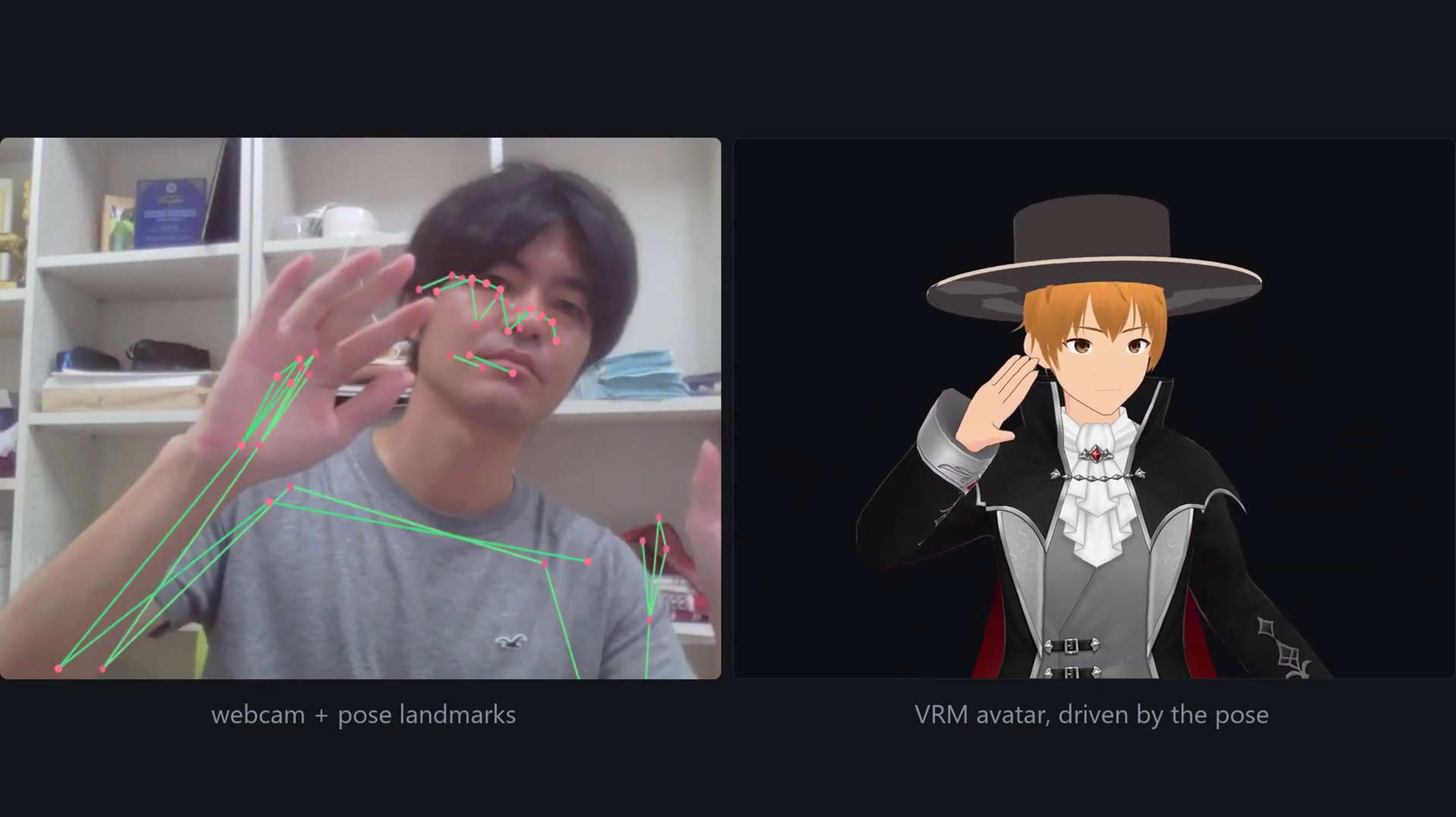
Table of Contents
The trap: positions, not rotations
Here is the trap that makes retargeting harder than it looks. MediaPipe gives you positions — “here is the elbow, here is the wrist.” But a skeleton isn’t positions; it’s rotations. You cannot move a bone to a point. You can only rotate it, and its children come along for the ride. So every landmark has to become an angle. The whole of retarget.ts is really one idea repeated: take a direction the bone should point, and find the rotation that gets it there.
Two coordinate systems (and mirroring)
The two worlds disagree. MediaPipe measures in metres with X to the image right, Y down, Z away from the camera. VRM 1.0 is Y up and Z forward, toward the viewer. Flipping Y and Z is a 180° rotation about X — get that wrong and avatars end up upside-down or inside-out. Then flip X too, which mirrors the pose: raise your right hand and the avatar raises the hand on the same side of the screen. The mirror is also why your right-side landmarks drive the avatar’s left bones — swapped on purpose.
// MediaPipe (x right, y down, z away) → VRM (y up, z toward viewer),
// with x flipped so the pose reads like a mirror. zTrust shrinks depth.
private toAvatarSpace(lm: Landmark, out: Vector3, zTrust = Z_TRUST): Vector3 {
  return out.set(-lm.x, -lm.y, -lm.z * zTrust);
}

// Mirrored: the person's RIGHT shoulder becomes the avatar's LEFT.
const avatarLeftShoulder  = this.toAvatarSpace(world[LM.rightShoulder], a);
const avatarRightShoulder = this.toAvatarSpace(world[LM.leftShoulder],  b);
Rest direction → target rotation
Now the actual retargeting. Every bone has a rest direction in the normalized rig — the left arm points along +X. Take where the bone should point (shoulder → elbow) and ask for the rotation that turns rest into target. three.js hands it to you in one call, setFromUnitVectors. That single primitive — a direction becomes a quaternion — is the heart of the whole file.
// Upper arm: rotate its rest direction onto the shoulder → elbow vector.
c.subVectors(elbow, shoulder).normalize();
target.setFromUnitVectors(restDir, c);   // direction → quaternion, one call
World space → local: walk the chain
That rotation is in world space, but a bone stores its rotation relative to its parent. So walk up the chain, multiply the rotations above the bone, and divide that back out (premultiply by the inverse). In the normalized humanoid rig every bone rests axis-aligned with the world, so multiplying the local rotations along a chain gives that joint’s world rotation without ever touching a matrix. The forearm is the neat part: its parent now includes the upper arm we just set, so what falls out is the elbow bend itself, relative to the arm.
// World rotation of a joint = product of the local rotations above it.
private chainQuaternion(chain: VRMHumanBoneName[], out: Quaternion): Quaternion {
  out.identity();
  for (const name of chain) {
    const node = this.vrm?.humanoid.getNormalizedBoneNode(name);
    if (node) out.multiply(node.quaternion);
  }
  return out;
}

// world → local: strip off the parent rotation.
this.chainQuaternion(CHAINS.leftArm, parent);
target.premultiply(parent.invert());
this.driveBone(upper, target, alpha);
Easing and release
Raw landmarks jitter, and a jittering avatar looks broken. So bones ease toward their target instead of snapping — at a rate that feels the same whether you run at 30 fps or 144, thanks to the 1 - exp(-rate·dt) smoothing. And when a hand leaves the frame, that arm drifts home to the avatar’s rest pose rather than freezing mid-air.
const FOLLOW_RATE = 14;   // chase the target when tracking
const RELEASE_RATE = 4;   // drift home when tracking is lost

// Frame-rate independent smoothing: same feel at 30 or 144 fps.
private ease(rate: number, delta: number): number {
  return 1 - Math.exp(-rate * delta);
}

// Applied as a spherical lerp toward the target rotation:
node.quaternion.slerp(target, this.ease(FOLLOW_RATE, delta));
The depth trap (trust Z less)
One more — and this one cost an evening. The avatar kept throwing an arm out sideways while both of mine were up. The maths was right; the input was not. A single camera cannot measure depth, so MediaPipe guesses it — and for a symmetric pose it reported one elbow twice as far forward as the other. The fix is to trust Z less than X and Y: shrink it with a Z_TRUST factor, and the limbs fall back toward the silhouette the camera actually saw, which is the part it gets right.
/**
 * A single camera cannot measure z, so the model infers it — and it drifts
 * badly: a symmetric pose can report one elbow twice as far forward as the
 * other. Shrinking z pulls limbs back toward the silhouette the camera saw.
 */
const Z_TRUST = 0.45;   // out.set(-lm.x, -lm.y, -lm.z * Z_TRUST)
One subtlety: the head keeps full depth. The ears-to-nose vector points almost straight along Z, so shrinking it there would exaggerate every head turn instead of steadying it — depth is only untrustworthy where the pose is broadly flat to the camera.
Frequently asked questions
Why can’t you just move the avatar’s bones to the landmark positions?
Because a skeleton is a hierarchy of rotations, not free-floating points. A bone can only rotate about its parent’s joint, and its children follow. So each landmark has to be converted into a rotation — the direction the bone should point — rather than a position to teleport to.
Why does the avatar mirror me instead of copying me directly?
Flipping the X axis makes it read like a mirror, which is what feels natural on screen: raise your right hand and the same side of the avatar goes up. The side effect is that your right-side landmarks drive the avatar’s left-side bones, so the left/right mapping is swapped deliberately in the code.
Why is single-camera depth so unreliable?
A single 2D camera has no true depth information, so the model infers Z — and that guess is the weakest part of the signal. For symmetric poses it can put one limb far in front of the other. Trusting Z less than the X/Y silhouette (which the camera genuinely sees) is a cheap, effective correction.
What’s next — Part 4
That’s retargeting: the webcam drives the avatar, in the browser, with no tracking suit and no depth camera. It is still rough — no finger tracking, no facial expressions yet, and the smoothing is deliberately simple. That is Part 4: smoothing, hands and face, which will drive the VRM expression system we set up in Part 2. The full code is on GitHub (Part 3 tagged v3-retargeting). New here? Start with Part 1: browser motion capture with MediaPipe, then Part 2: loading a VRM avatar.
Takashi Fukushima — Sports Science & Pose Estimation.
▶ Subscribe on YouTube · GitHub · Website · Contact